Airtable template · €49
The Session Book
A simple client tracker for solo coaches, on free Airtable.
29 Oct 2026 · 3 min read · By Sophie Kazandjian
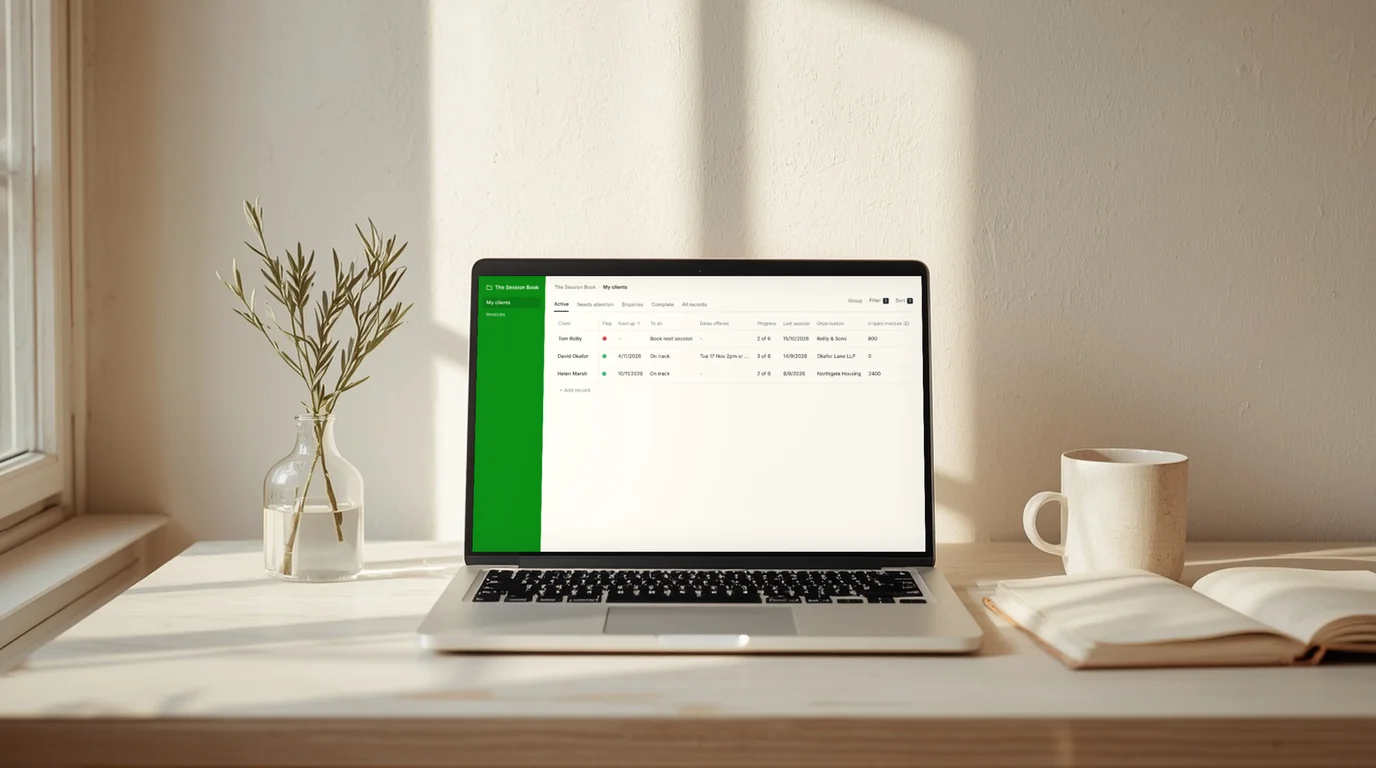
Every client on one screen, with whoever needs booking at the top and what each one owes beside their name.
Who it’s for
Solo leadership and executive coaches with ten to twenty clients on packages of six to twelve sessions, often paid for by the client’s organisation. It also suits the EA or practice assistant who keeps those records and wants something ready-made.
Airtable template · one-off
The Session Book
The template to copy into your free Airtable account, and the nine-page setup and everyday guide as a PDF.
Yours on screen the moment you pay, and by email so you can find it again.
Get The Session Book, €49 →One screen that sorts itself
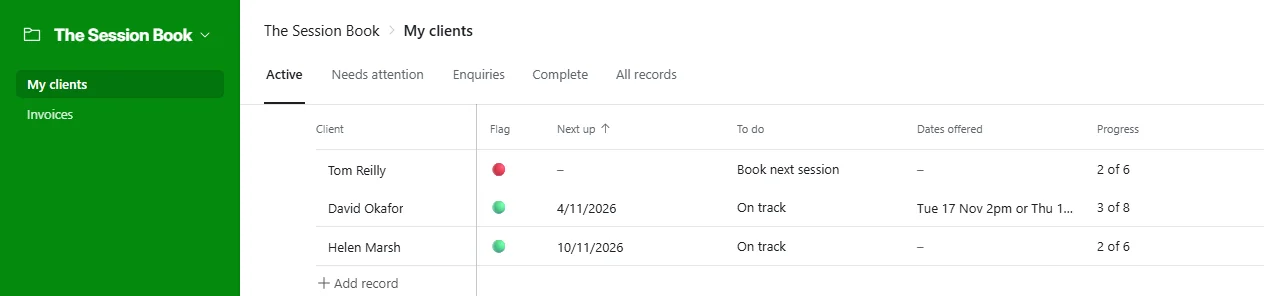
Each line starts with a dot. Red means something needs doing now, amber means you are waiting on someone else, and green means all is well. Tom has nothing booked, so he sits at the top.
The list sorts itself. Anyone with nothing booked rises to the top, then everyone else follows in order of their next session, so the first lines are always the ones to act on. The tabs along the top show the same practice from different angles. Active is everyone you are coaching. Needs attention holds only the red dots: it’s the list to work through on a Monday morning, and each client drops off it once they’re dealt with. Enquiries holds people you have spoken to but not yet contracted, Complete holds finished programmes, and All records holds everyone.
What it keeps track of
Each client has a page laid out in the order you would ask the questions: role, organisation, the sponsor who pays if that isn’t the client, then the contract, its objectives and, if you want it there, the signed copy itself. Below that sits every session, with your private notes, the actions the client agreed and the threads to pick up next time.
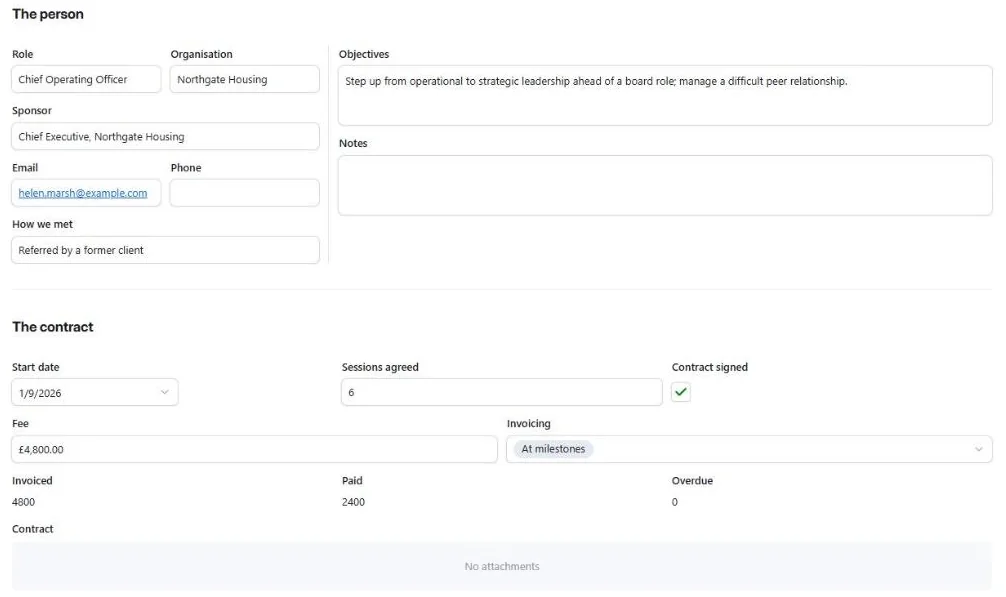
Progress counts sessions used against sessions agreed. A late cancellation you are charging for counts as used without moving the last-session date, so a sponsor asking how many sessions took place gets a true answer. Invoices go in as you send them, and the Unpaid tab shows what is still owed. If a booked date passes with no session logged, the dot turns red the next morning.

It doesn’t make invoices, take bookings or sync with a calendar. You type the dates in, and your invoices are still made wherever you make them now.
Where a CRM gets in the way
CRMs such as HubSpot are built for sales teams: pipelines of deals, email sequences, lead scoring, and dashboards for a manager watching a dozen reps. A solo coach with fifteen senior clients needs none of that. They pay for it anyway in set-up time and a screen full of buttons, and the features worth having often sit on a paid plan.
The Session Book starts from the other end. It holds what a coaching practice runs on (the contract, the sessions, the sponsor, the money) and nothing else. There is nothing to configure: copy it, click Launch, and go.
How it works
After you pay, the template link and the guide appear on screen and arrive by email. Open the link, sign in to Airtable or create a free account, and click Copy base. The copy is yours from that moment. Clear the sample clients and add your own, about ten minutes in all.
What you need
A free Airtable account and a browser. There is nothing to install, no subscription and no paid Airtable plan. The Session Book uses no automations or extensions, so the free plan’s limits on those never apply.
Your data
Your copy sits in your own Airtable account. I can’t see it, and neither can anyone else who bought The Session Book. Airtable encrypts data in transit and at rest and holds SOC 2 Type 2 and ISO 27001 certifications. On the free plan, data is stored in the United States, with transfers from the UK and EU covered by Standard Contractual Clauses in Airtable’s data processing addendum. If your clients or sponsors need records kept in Europe, check with them before adding notes. A SeaTable edition with EU hosting is planned.
The Session Book
€49, once
The Airtable template, the nine-page setup and everyday guide as a PDF, and help by email with anything that doesn’t behave as the guide says, or a small change so it fits your practice, such as the currency or an extra status.
The price includes VAT where it applies, and business buyers can add a VAT number at checkout.
Buy The Session Book →Who made it
I’m Sophie Kazandjian. I have supported solo leadership and executive coaches as an EA since 2007, and The Session Book follows the way a senior coach’s practice runs.
Questions
- Can I work in euros or dollars?
Yes. Amounts show in pounds until you change the currency symbol on two fields, which takes a minute.
- I already use Airtable.
The Session Book arrives as one more base and touches nothing else in your account.
- What if I outgrow the free plan?
The free plan allows 1,000 records per base. Fifteen clients with a dozen sessions each, plus their invoices, come to around 250 a year.
- Can I add my own fields?
Yes. Adding a column is safe. Renaming or deleting the existing ones would stop the dots and progress working.
- Can you adjust it for me?
Small changes, yes: a different currency, a renamed or extra status, a field of your own. Tell me what you’d like and I’ll send the steps, so your copy and your notes stay yours alone.
- Does it depend on you after I buy?
No. It keeps working for as long as your Airtable account does.
- What if it doesn’t work for me?
If it doesn’t work as the guide describes and I can’t put it right, I’ll refund you in full within 14 days.
Checkout is through Stripe, in euros. Your email address is used to send you the template link and the guide, and for nothing else. Questions before or after buying go to [email protected]. Website terms.